Amazon Relay scorecard: how the performance score works and how to dispute it
Your Amazon Relay performance score decides which freight you can reach, from auctions to contracts to early spot loads. Here is how it is calculated, what each grade opens, and what to gather when you dispute an impact.
Short answer
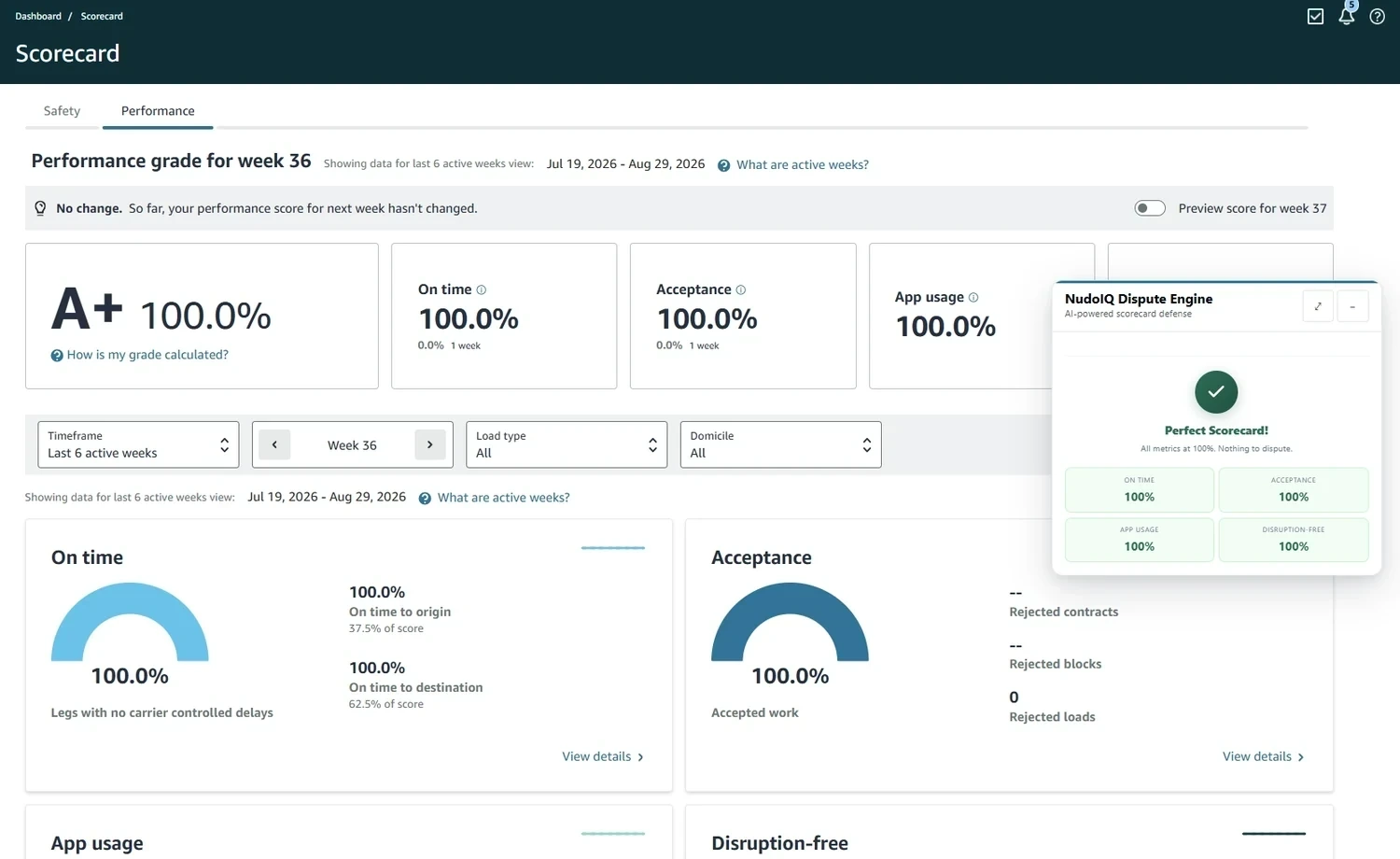
The Amazon Relay scorecard gives each carrier a performance score from 0% to 100%, shown as a letter grade from F to A+. It covers the last six weeks and four metrics (on-time, acceptance, app usage and disruption-free).
Amazon Relay scorecard at a glance
| Score | 0% to 100%, shown as a letter grade from F to A+ |
|---|---|
| Window | Your last six weeks of hauls |
| Eligibility | Ten or more Relay loads in the last six active weeks |
| Metrics | On-time, acceptance, app usage and disruption-free |
| Overall score | Equals the lowest of the four metrics |
| What higher grades open | C+ for auctions, B for new contracts, B+ or higher for early access to new spot loads |
| Disputes | Filed in your Relay account; Amazon decides the outcome |
| Dispute deadline | Amazon does not publish one |
On this page
What is the Amazon Relay scorecard?
The Amazon Relay scorecard is the performance score Amazon gives every Relay carrier. It runs from 0% to 100% and shows as a letter grade from F to A+. It reflects your last six weeks of hauls, and your grade decides which freight you can reach on Relay, from auctions and contracts to early access on new spot loads.
You find it in your Relay account. Amazon explains the system on its performance score page and in its guide to performance grades.
Two numbers to know:
- Six weeks. The score looks at your recent hauls, not your whole history.
- Ten loads. You become eligible for a grade after completing ten or more Relay loads in the last six active weeks.
If you are new and still setting up, start with what Amazon Relay is and the carrier requirements.
- Week 1
- Week 2
- Week 3
- Week 4
- Week 5
- Week 6
How is the Amazon Relay performance score calculated?
Amazon Relay scores four metrics: on-time, acceptance, app usage and disruption-free. Your overall performance score equals the lowest of those four. Amazon says a carrier is only as good as its lowest metric, so one weak area sets your grade no matter how strong the other three are.
Here is what each metric measures and what pulls it down:
On-time
What Amazon measures
Share of loads that arrive by the planned time at origin and destination, measured from the check-in timestamp
What hurts it
Late arrivals at pickup or delivery, late check-ins
Acceptance
What Amazon measures
How often you reject (cancel) loads you booked, including expired loads
What hurts it
Cancelling booked loads, letting loads expire, cancelling close to pickup (the closer to pickup, the bigger the penalty)
App usage
What Amazon measures
Whether drivers follow the rules for the Relay mobile app on Amazon loads
What hurts it
Closing the app or turning off location services during a trip
Disruption-free
What Amazon measures
Interruptions in transit
What hurts it
Stationary trailers, loads with no assigned driver
Why does one bad metric drag down the whole grade?
Because the overall score is the lowest of the four metrics, not an average. A carrier with near-perfect on-time, acceptance and disruption-free numbers still gets graded on whatever its weakest metric is. Fixing your strongest area does nothing for the grade. Fixing the weakest one is the only move that raises it.
Picture it with made-up numbers. Your trucks hit every appointment, you never cancel, and nothing sits stationary. Those three metrics look great. But one driver keeps closing the Relay app mid-trip, and your app usage number lands well below the rest. Your score is now your app usage number. All that on-time work doesn't show up in the grade at all.
How to improve your Amazon Relay scorecard
- Find your lowest metric first. That number is your score.
- Fix the habit behind it with the driver or dispatcher who owns it.
- Watch the daily prediction (below) to see if the fix is moving the number.
Amazon Relay score chart: what does each grade open?
Every grade keeps load board access, Relay Rewards eligibility and Post A Truck, with higher grades getting priority matching on Post A Truck. From there, freight opens up by grade: C+ for auctions, B for new contracts, and B+ or higher for early access to new spot loads. Amazon lays this out in its grades guide.
A few details matter here:
- Auctions also depend on equipment count, tenure and CARB compliance, not just grade.
- Contracts can be lost. Carriers can lose booked contracts if they drop below C+.
- Spot loads appear on the load board at staggered times based on grade. A lower grade can mean you see a load after higher-graded carriers already had their shot at it. That's one reason your board can look thinner than another carrier's, covered in why the load board isn't showing loads.
Amazon Relay score chart: what each grade opens
How does the scorecard affect Relay Rewards?
Amazon evaluates your Relay Rewards tier monthly, on the 5th. It uses your company's lowest score from the previous month, plus the miles you drove last month and your tenure. Everyone starts at Basic, and the program is US only. So a bad week can follow you into next month's tier.
Amazon explains the tiers on its Relay Rewards page. The key point for your scorecard: Rewards uses the lowest score from the month, not your average or your final week.
Can you see your Amazon Relay score before it changes?
Yes. Amazon Relay gives carriers a daily prediction of their upcoming score in their account, plus weekly performance trends. Check the prediction daily so a slipping metric shows up before it becomes your grade. It's the earliest warning you get that a driver habit or a disrupted load is costing you.
A simple routine:
- Open the daily prediction each morning.
- Note which metric is lowest and whether it moved.
- If it dropped, find the load behind it while the details are fresh.
- Decide right away whether that load is worth disputing.
How do you dispute an Amazon Relay performance score impact?
Carriers can dispute a performance score impact when something happens in transit. You file the dispute in your Relay account, and Amazon decides the outcome. Amazon does not publish a step-by-step procedure or a deadline for scorecard disputes, so file as soon as you spot the impact, while your records are complete.
Before you file, pull together evidence that shows what actually happened on that load:
Dispute evidence checklist
0 / 5
Then write it up plainly: the load, the impact you're disputing, what happened, and the evidence that shows it. Keep it short and factual.
Our free Relay dispute letter tool turns the facts you tick into a short letter you can edit and paste into your dispute.
One thing that trips carriers up: the 30-day dispute window Amazon lists applies to pay disputes, not scorecard impacts. Don't assume you have 30 days on a score dispute.
Our Amazon Relay disputes guide lists each dispute type and what Amazon publishes about it.
What does Amazon not publish about the scorecard?
Amazon does not publish the exact score that maps to each letter grade, how long a single violation stays on your score, a deadline for scorecard disputes, or dispute success rates. Anyone quoting precise cutoffs or win rates is guessing. Work from what Amazon does publish: the four metrics, the lowest-metric rule and the six-week window.
What you can rely on: the six-week window means a bad stretch rolls off as you haul clean loads. Ten or more loads in six active weeks keeps you graded. And the lowest metric is always the one to fix.
How can NudoIQ help with scorecard disputes?
NudoIQ is a Chrome extension for the Amazon Relay load board, and it includes a dispute letter tool. It reads your scorecard, identifies the violation behind the score, and drafts a letter that cites Amazon policy. You review it, edit it and submit it yourself. Amazon decides every outcome, and NudoIQ can't promise one.
What it saves you is the writing. Instead of starting from a blank page at the end of a long day, you get a draft built from your own scorecard that you can check against your evidence and send. One carrier, Futo, wrote on the Chrome Web Store: "Their performance dispute feature is a life saver."
NudoIQ is $49.99 a month for every feature (see pricing). Try it free for 7 days. No card required. Only $49.99 after the trial is over. Cancel anytime. It's rated 5.0 on the Chrome Web Store.
Turn an Amazon Relay scorecard hit into a filed dispute.
NudoIQ reads your scorecard, pulls out the violation behind the score, and drafts a dispute letter citing Amazon policy. You review it, add context, and submit.
- Find the violation without hunting for it
- File the same day instead of letting it stand
- Add what happened in your own words
7 days free. No card required. Only $49.99 after · 5.0 on the Chrome Web Store
Frequently asked questions
What is a good Amazon Relay scorecard grade?
Grades run from F to A+. C+ opens freight auctions, B opens new contracts, and B+, A and A+ get early access to new spot loads. Amazon does not publish the exact percentage behind each letter.
How long does a late load stay on my Amazon Relay scorecard?
Amazon does not publish how long a single violation stays. The score reflects your last six weeks of hauls, so older loads stop counting as they fall out of that window.
How many loads do I need for an Amazon Relay grade?
You become eligible for a grade after completing ten or more Relay loads in the last six active weeks. Below that, you don't get a letter grade.
Does cancelling a load hurt my Amazon Relay score?
Yes. Cancelled and expired loads count against your acceptance metric, and the closer the cancellation is to pickup time, the bigger the penalty. If acceptance becomes your lowest metric, it becomes your score.
Can I lose an Amazon Relay contract because of my score?
Yes. Amazon says carriers can lose booked contracts if they drop below C+. Booking new contracts requires B or above.
Is there a deadline to dispute an Amazon Relay scorecard impact?
Amazon does not publish one. The 30-day window it lists is for pay disputes. File a score dispute in your Relay account as soon as you see the impact.