Short answer
An Amazon Relay Chrome extension is an add-on that works inside the Relay load board in your own browser. NudoIQ refreshes the board and can book loads that clear your Min Net Profit. It never asks for your Amazon password.
What does an Amazon Relay Chrome extension do?
An Amazon Relay Chrome extension is an add-on for your browser that works on the Relay load board. You still sign in to Relay the way you always do. The extension adds its tools on top of the board you already use. If you're new to the board itself, start with how the Amazon Relay load board works.
Good loads on Relay go fast, and nobody can sit and hit reload all day. An extension reloads the board for you, marks the new loads and, if you want, books the ones that fit your rules.
NudoIQ puts a bar above Relay's search. On it you get START and STOP and a SPEED setting you choose. A badge says IDLE or ACTIVE, so you can tell at a glance if it's running.
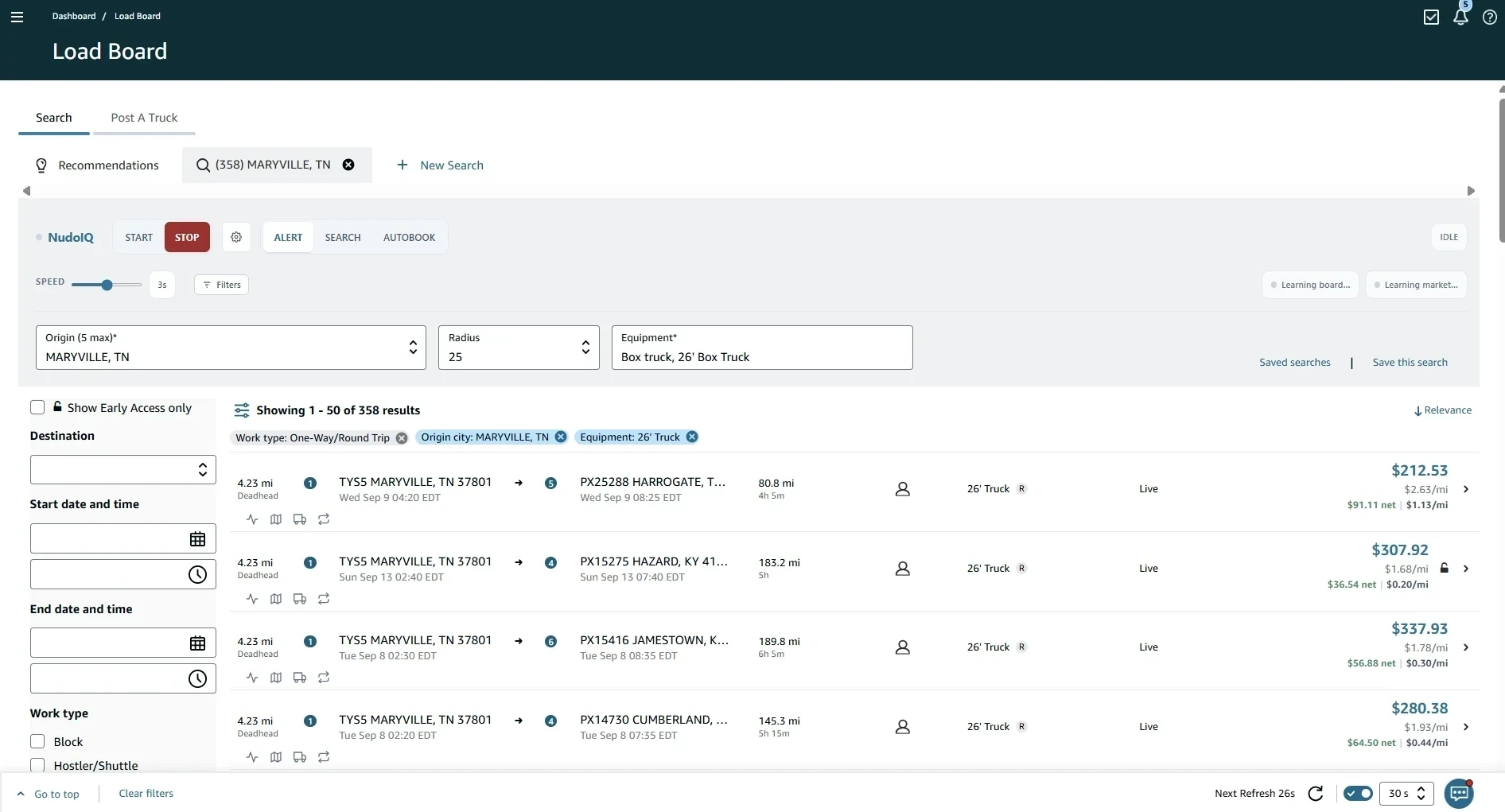
Amazon Relay Chrome extension features
Everything below is in your free week and the paid plan.
- Auto refresh. The board reloads on a timer you set, so you stop hitting reload by hand. More in our Amazon Relay auto refresh guide.
- NEW and PRICE UP tags. New loads get an orange NEW tag, and a load whose price went up gets a green PRICE UP tag.
- Three modes. ALERT sounds an alert on the page when a load clears your minimums, SEARCH refreshes quietly and floats those loads to the top, and AUTOBOOK books loads that clear your Min Net Profit.
- Limits you set on AutoBook. It books only loads that clear your Min Net Profit and skips a load it can't fully price. It stops at your Max books, from 1 to 20. See how the auto booker works.
- Instant Book. On a NEW or PRICE UP row, Instant Book books the load in one tap, with no confirmation screen.
- Net profit on every load card. You see the net and the $/mile before you book.
- Price History. Lane Intelligence shows what that lane paid in the past.
- Open in Google Maps. You can check the route the load takes before you commit.
- Post Truck. You get a recommended bid that gets better the more you use it. It isn't accurate right after install. More on posting a truck on Relay.
- Find backhaul. It helps you look for a load to take after this one ends.
- Scorecard dispute letters. NudoIQ drafts the letter from the violation, and you submit it. More on the Amazon Relay scorecard.
- Pro View and trip ETAs. You see each leg's facility code and address, times and driver type, plus miles left and ETA vs scheduled on your trips page.
- English and Spanish. You can run NudoIQ in either language.
How do you install and set up NudoIQ?
Setup takes four steps. Here they are for Chrome on a computer.
- Add NudoIQ to Chrome from the Chrome Web Store. It takes about a minute.
- Open Amazon Relay in the same Chrome profile and sign in as you normally do. The NudoIQ bar shows up above Relay's search.
- Start your free week from the NudoIQ bar. You don't need a card to start. It's 7 days free, then $49.99/month, and you can cancel anytime.
- Pick your mode and your SPEED, then press START. Your board now refreshes on its own.
Before you turn on AUTOBOOK, set your Min Net Profit and your Max books. If you'd rather watch what matches first, start in ALERT mode and switch later.
If the bar doesn't show up, refresh the Relay tab first. That fixes it nearly every time. If it still doesn't show, check that Relay is open in the same Chrome profile where you added NudoIQ.
Amazon Relay web app vs Chrome extension
A web app is a separate site. You open it in its own tab and log in there. A Chrome extension works inside a page you already have open.
| Web app | Chrome extension (NudoIQ) | |
|---|---|---|
| Where it runs | On its own site | Inside your Relay tab |
| Login | A second login | The Relay session you already have |
| What you see | Its own screens | The Relay board, plus the NudoIQ bar and tags |
NudoIQ never asks for your Amazon password and never stores it.
You are responsible for your Relay account and for following Relay's terms, so read them before you run any extension. NudoIQ is independent software and isn't affiliated with Amazon.
How does the NudoIQ Chrome extension work?
It works on the front end, in the Relay page you already have open.
- Your own session. It runs only on Relay pages, inside your signed-in Relay tab.
- Only what you could do by hand. Refresh the board, look over loads, book one.
- No backend access. It works in the page, not in Amazon's systems behind it.
- No password. There's no Amazon password field anywhere in it.
That's how it works, not a promise about how Amazon treats extensions. Amazon doesn't publish one.
What do you need to run it?
- A computer with Chrome. Edge, Brave and other Chromium browsers on a computer work too.
- An Amazon Relay carrier account. NudoIQ works inside your account. It doesn't give you Relay access.
- Android works with the right browser. You can use a Chromium browser that takes extensions, like Kiwi or Lemur.
- iPhone doesn't work. NudoIQ can't run on an iPhone.
What does an Amazon Relay extension cost?
NudoIQ starts with your free week, which has every feature, and nothing runs until you start it. It's 7 days free with no card needed to start. After that it's $49.99/month, one price no matter how many trucks you run, and you can cancel anytime. See pricing for the details.
NudoIQ is rated 5.0 on the Chrome Web Store and used by 300+ carriers.
Want to compare extensions first?
If you're also looking at LoadFetcher, here's the Load Fetcher extension vs NudoIQ, row by row, from its own listing and plans.
If you're still deciding, our guide to the best Amazon Relay extensions compares the options side by side. When you're ready, add NudoIQ to Chrome and try it on your own board for 7 days.