Short answer
To post a truck on Amazon Relay, create a Post A Truck order with your availability (up to two weeks ahead), a pickup radius and maximum deadhead, cities to include or exclude, one-way or round trip, distance or trip length limits, maximum stops, stem time and your minimum rate per mile. Relay matches loads to the order and books them for you. The order stays open until it matches or your availability window ends.
What is Post A Truck on Amazon Relay?
Post A Truck is the opposite of searching the board. You post your equipment and driver availability, set the least you'll take, and Relay brings matching loads to you. Amazon's Post A Truck guide says matched carriers get first access to freight in their window, before it reaches the load board.
Amazon also says it will instantly book loads that match your criteria, so you don't have to watch the board. That's the upside and the risk in one sentence: whatever matches is yours to run.
Who can use Post A Truck?
Amazon says approved Relay carriers can access it. Beyond that:
- Equipment. Amazon lists power only loads, box trucks (dock height and liftgate required) and live loads using your own tractor-trailer.
- Grades. Every grade keeps Post A Truck. Higher grades get priority matching. Our scorecard guide explains how grades work.
- Account. You need an approved carrier account first. See the Amazon Relay requirements checklist.
How do you post a truck on Amazon Relay, step by step?
Amazon's guides describe what goes into an order rather than a screen-by-screen path. These are the choices an order asks you to make, in a sensible order to work through them.
- Pick how you start. From scratch, from recommendations, or from a saved search (see the next section).
- Set your availability. The days and hours your truck and driver are free, up to two weeks in advance.
- Set where the first pickup can be. A radius for first pickup and a maximum deadhead.
- Choose destinations. Include or exclude cities, and add preferred destinations.
- Pick one-way or round trip. A round trip brings you back. A one-way needs a box truck or your own trailer.
- Set distance or trip duration limits so a match fits your driver's day.
- Set maximum stops and stem time.
- Set your price. Your minimum rate per mile and a payout amount.
- Check the match outlook, adjust if it's Low, and post the order.
You can create several orders for different trucks and lanes, and edit or cancel them any time.
What are the three ways to start an order?
| Way to start | How it works |
|---|---|
| From scratch | You fill in every setting yourself |
| From recommendations | You enter a few settings and Relay fills the rest from your previous bookings |
| From a saved search | A search you saved on the board becomes the template |
If you already have a saved search for your home lane, starting from it is the fastest way to post.
What do High, Medium and Low match outlook mean?
Match outlook is Relay's estimate of how likely your order is to match. It's based on your criteria and the previous 6 weeks of loads.
| Outlook | What Amazon says | What to do |
|---|---|---|
| High | Good chance of a match | Post it |
| Medium | Decent chance, room to improve | Loosen one setting if timing matters |
| Low | Adjust radius, distance, destination or price | Change one of those and check again |
Amazon says matching also uses market rates and Relay performance scores. Narrow criteria give fewer matches, and flexibility on routes or timing can help. So price isn't the only lever: Amazon lists radius, distance and destination right next to it.
What are linked orders and block orders?
They solve two different problems.
- Linked orders connect several orders as one fulfilled order, so you don't overbook the same truck. Once one is fulfilled, the unfulfilled trips are cancelled for you.
- Block orders have trips that start and end at the same location. A matched block is paid in full even if Amazon doesn't use the entire block length. Blocks are explained in our guide to Amazon Relay contracts and blocks.
If you post one truck on several lanes at once, linked orders are the setting that keeps you from matching twice.
What happens when your order matches?
An order stays open until it matches or your availability window expires. Amazon's general rule for booked loads is plain. In Amazon's words, "if an Amazon load is booked, it's the Relay carrier's responsibility to execute it."
Rejecting a booked load counts against your acceptance metric, and the closer to pickup, the higher the penalty. Our guide on what happens if you cancel a load covers it.
How do you cancel a Post A Truck order?
Amazon says you can cancel an order if your availability changes, and edit or cancel orders any time. Do it as soon as plans change. An open order with the wrong hours can match a load your driver can't run, and then you're cancelling a booked load instead of an order.
If you're using Post A Truck to chain work after a delivery, our guide to booking multiple loads on Amazon Relay walks through the hours math first.
How does NudoIQ's One-Click Post A Truck work?
NudoIQ is a Chrome extension that runs inside your signed-in Relay load board tab. It's an independent tool, not made by or affiliated with Amazon. It adds a row of buttons under each load card, and the third one opens One-Click Post A Truck.
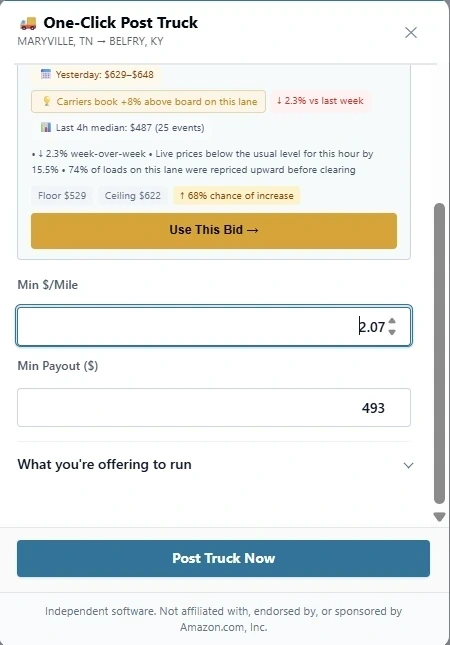
The panel shows that load's origin, destination, distance and board price next to your minimum rate per mile and minimum payout. Above the price field sits a recommended bid, based on what that lane has paid before.
Be clear on one thing: the recommended bid is not accurate right after install. It needs time gathering data about your area, and it improves with use. Treat it as a starting point and set your own price.
When the price is right, click Post Truck Now and an order is created for that load automatically. You skip building the order from a blank form.
NudoIQ is used by 300+ carriers. Try it with a 7-day free trial, and cancel anytime. It's rated 5.0 on the Chrome Web Store.